
General Principles
We use RSA-based digital signatures to ensure that each API request is authenticated.
The provided API key must be included in the X-Key-Id request header.
The generated signature must be included in the X-Signature request header.
Requests without these headers will be treated as unauthorized access.
Acquiring API Key
Make sure you have successfully onboarded to our business portal! The API key generation currently is provided only for users who have access to our platform.
There is step-by-step guide how to generate an API key. The API key is needed for secure and reliable API integration: by that we can identify you as our dedicated client. The API key shall be used in the header X-Key-Id for each request from your side.
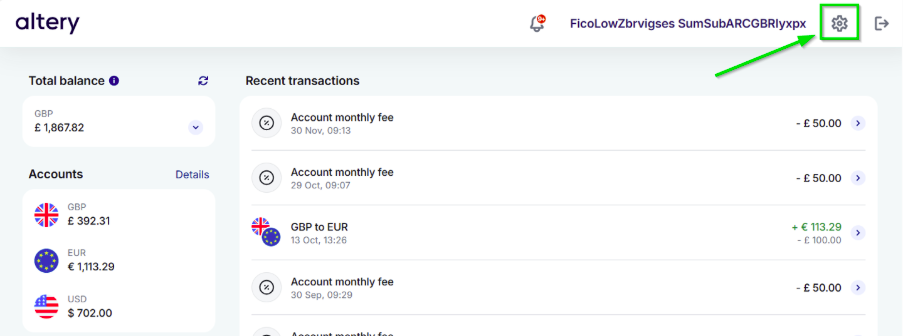
Step №1: Open Settings (gear icon, top-right corner)
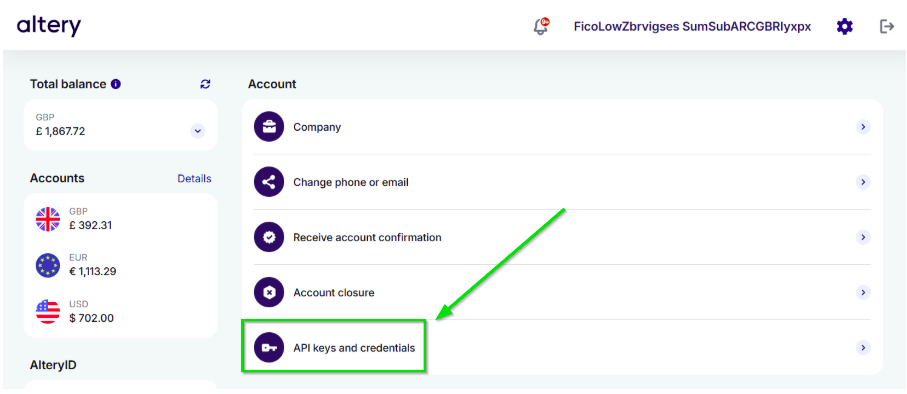
Step №2: Navigate to “API Keys and Credentials”
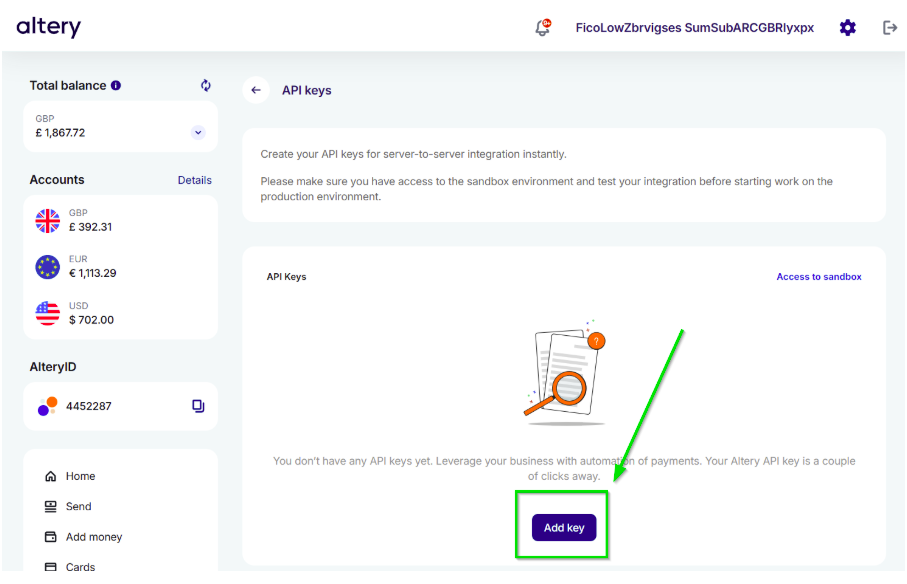
Step №3: Select “Add Key”, then specify your IP address and the desired key name
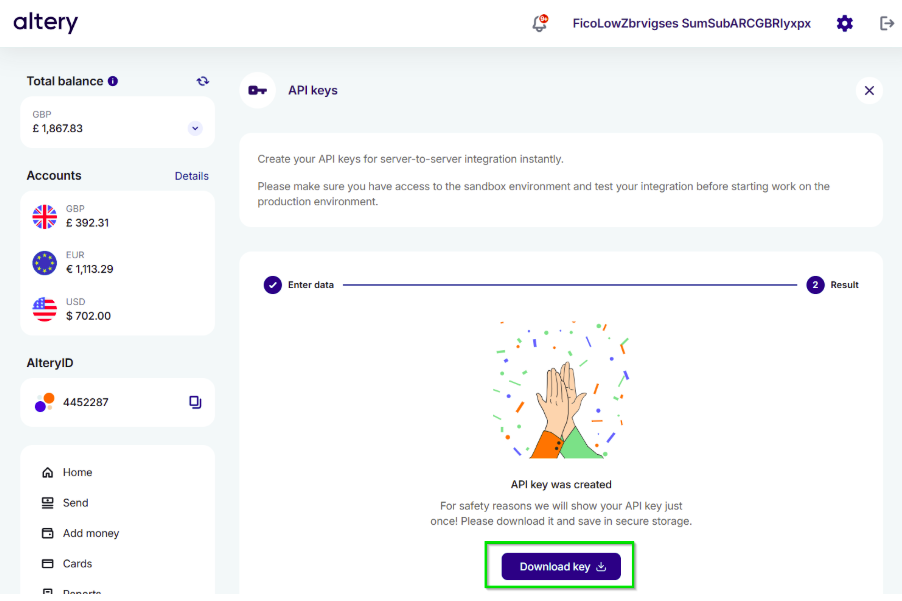
Step №4: Download the API key and extract the received files into a secure location.
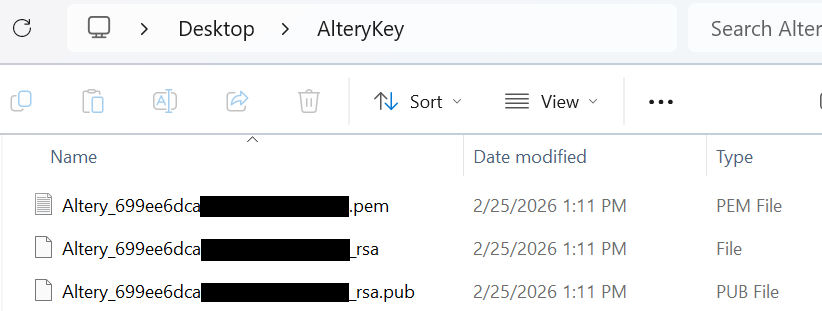
Step №5: The archive contains three files: make sure you have all of them
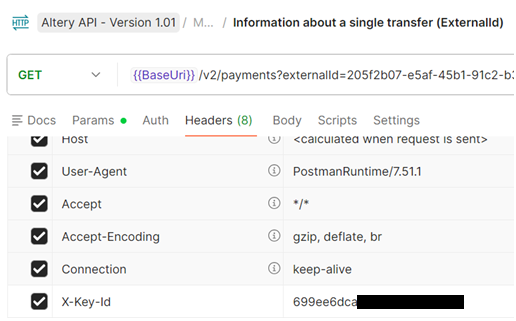
Step №6: Use acquired API key in dedicated header 'X-Key-Id' for each request
Request Signing Algorithm
Make sure you have acquired API key! The signature can be calculated only for clients who have successfully onboarded and generated their unique API key.
Alongside with API key we need to receive unique encrypted signature from your request. The signature is calculated per request, so by that you can be sure only Altery can receive and process any data you have sent. The signature shall be used in the header X-Signature for each request from your side.
Use provided examples for signing your requests:
function create_signature(request, private_key):
    # Step 1: Build string to sign
    string_to_sign = build_string_to_sign(request, separator)

    # Step 2: Convert to bytes (UTF-8)
    data_bytes = utf8_bytes(string_to_sign)

    # Step 3: Sign data using RSA private key
    signature_bytes = RSA_sign(private_key, data_bytes)

    # Step 4: Encode signature to Base64
    signature_base64 = Base64Encode(signature_bytes)

    return signature_base64


function build_string_to_sign(request):
    string_to_sign = empty

    if request.body is null OR whitespace:
        path = extract_url_path(request.original_url)
        string_to_sign = path
    else:
        string_to_sign = request.body

    return string_to_sign


function extract_url_path(original_url):
    # Extract everything after the domain name
    # Example:
    # https://api.domain.com/payments/123 → /payments/123
    pattern = "^http[s]?://[^/]+(/.+)$"

    match = regex_match(original_url, pattern, ignore_case = true)

    if match exists:
        return match.group(1)
    else:
        return ""
using System.Security.Cryptography;
using System.Text;
using var httpClient = new HttpClient();
httpClient.BaseAddress = new Uri("https://api.sandbox.altery.com");
httpClient.DefaultRequestHeaders.Add("X-Key-Id", "<your API Key ID>");
var pemText = File.ReadAllText("<path to your PEM private key>");
var getBalancesPath = "/v1/user/balance/total";
var getBalancesRequest = new HttpRequestMessage(HttpMethod.Get, getBalancesPath);
getBalancesRequest.Headers.Add("X-Signature", SignRequest(pemText, getBalancesPath));
var getBalancesResponse = await httpClient.SendAsync(getBalancesRequest);
var getBalancesResponseData = await getBalancesResponse.Content.ReadAsStringAsync();
Console.WriteLine(getBalancesResponseData);
static string SignRequest(string pemText, string path, string? body = null)
{
using var rsa = RSA.Create();
rsa.ImportFromPem(pemText);
var dataToSign = body ?? path;
var signatureBytes = rsa.SignData(
Encoding.UTF8.GetBytes(dataToSign),
HashAlgorithmName.SHA512,
RSASignaturePadding.Pkcs1
);
var signature = Convert.ToBase64String(signatureBytes);
return signature;
}import base64
import requests
from cryptography.hazmat.primitives import hashes, serialization
from cryptography.hazmat.primitives.asymmetric import padding
BASE_URL = "https://api.sandbox.altery.com"
API_KEY_ID = "<your API Key ID>"
PEM_PATH = "<path to your PEM private key>"
def sign_request(pem_text: str, path: str, body: str | None = None) -> str:
private_key = serialization.load_pem_private_key(
pem_text.encode(),
password=None
)
data_to_sign = body if body is not None else path
signature_bytes = private_key.sign(
data_to_sign.encode("utf-8"),
padding.PKCS1v15(),
hashes.SHA512()
)
return base64.b64encode(signature_bytes).decode("utf-8")
def main():
with open(PEM_PATH, "r") as f:
pem_text = f.read()
session = requests.Session()
session.headers.update({
"X-Key-Id": API_KEY_ID
})
get_balances_path = "/v1/user/balance/total"
signature = sign_request(pem_text, get_balances_path)
headers = {
"X-Signature": signature
}
response = session.get(
BASE_URL + get_balances_path,
headers=headers
)
print("Status:", response.status_code)
print(response.text)
if __name__ == "__main__":
main()